 LinkJig
Macros for your serial device, one tap each
If you type the same commands again and again (a version query, a ping, a sensor read), save each one as a macro and send it with one tap. LinkJig marks every macro line in the log and shows how long the reply took.
This session runs on LinkJig's built-in demo device, which answers a few simple text commands. The replies are simulated; macros work the same on any serial, Bluetooth or TCP link.
Add a macro
- Connect to your device and open the Terminal.
- Below the send bar, tap an empty + Assign button.
- Give it a Name (what the button shows) and the Data to send, then Save.
Long-press a macro button to edit, duplicate or clear it.
Send
Tap the button. The command goes out with the send bar's current format and line ending.
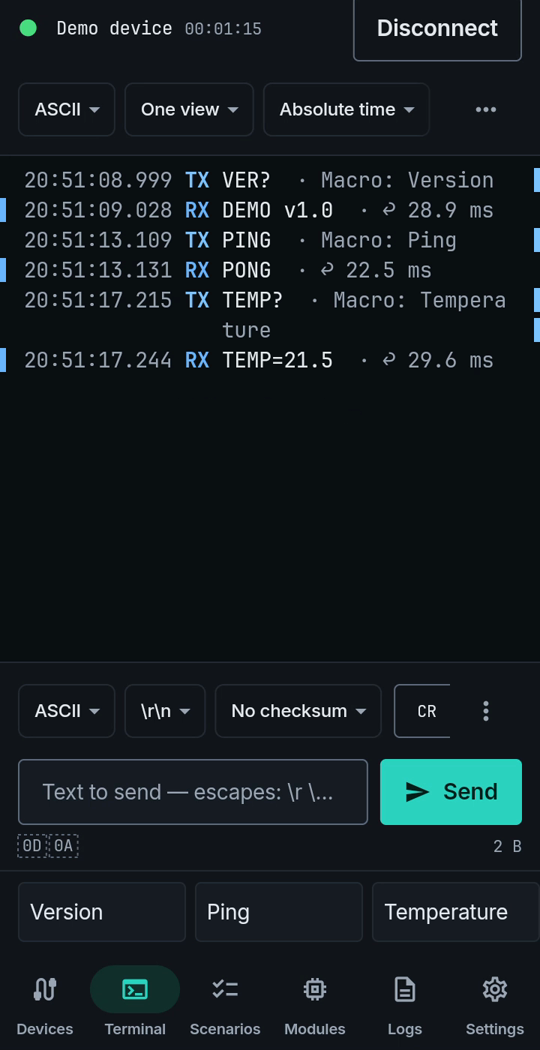
20:51:08.999 TX VER?   · Macro: Version
20:51:09.028 RX DEMO v1.0   · ↩ 28.9 ms
20:51:13.109 TX PING   · Macro: Ping
20:51:13.131 RX PONG   · ↩ 22.5 ms
Each sent line names the macro, and each reply shows the time since the command went out.
Limits
- Shown on the built-in demo device; its replies are simulated.
- On Windows the first twelve macros also have the F1–F12 keys.
Try it
Watch the demo on YouTube. LinkJig is on Google Play and the Microsoft Store.