 LinkJig
Garbled serial output? Find the baud rate from your phone
Readable text turning into junk usually means the two sides disagree on the baud rate. You can guess speeds one at a time, or let the terminal try them for you.
This is a real session: an ESP-01S set to 38400 baud, connected to an Android phone over USB OTG and a USB-UART adapter.
What a wrong speed looks like
At 115200 baud, the module's reply to AT was three unreadable bytes:
23:42:31.865 TX AT
23:42:31.890 RX <0xE0><0xFC><0xFC>
Let LinkJig search
- Connect the adapter and open the connection dialog for your serial device.
- Tap the search icon next to Baud rate.
- Keep the command
AT\r\nand the expected replyOK, then tap Search. - When a speed answers, tap Use 38400.
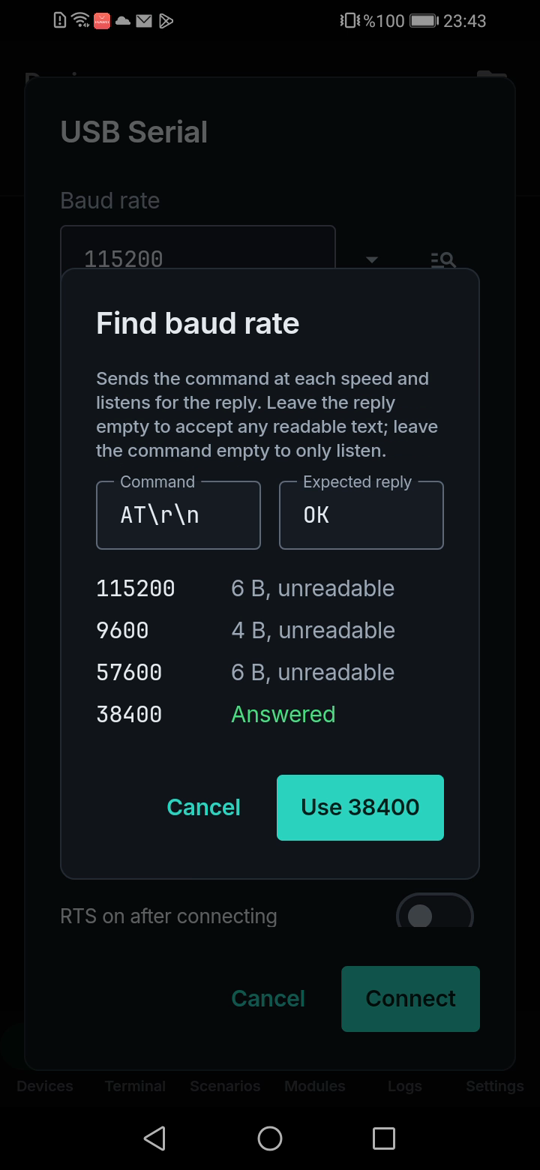
The search stopped at the speed that answered:
115200  6 B, unreadable
9600    4 B, unreadable
57600   6 B, unreadable
38400   Answered
Check the result by sending commands at that speed:
23:43:16.233 TX AT
23:43:16.354 RX AT
OK
How it works
- It tries 18 standard speeds, most common first.
- It sends the command up to twice per speed, because some modules swallow the reply to the first one, and listens for 300 ms.
- Your device may not speak AT. Leave the reply empty to accept any readable text, or leave the command empty to only listen.
Limits
- The device must answer the command, or print readable text.
- Speeds outside the standard list are not tried.
- Live-tested with a CH340 adapter on Android 9. FTDI, CP210x and PL2303 are supported by the driver, but have not been tested on camera yet.
Try it
Watch the demo on YouTube. LinkJig is on Google Play and the Microsoft Store.