 LinkJig
Is your ESP8266 alive? Check it from your phone
Before you debug wiring, firmware or your own code, it helps to know whether the module answers at all. LinkJig sends four read-only AT commands and shows the firmware, Wi-Fi mode and address on one card.
This is a real session: an ESP-01S with AT firmware 2.2.0, connected to an Android phone over USB OTG and a CH340 USB-UART adapter.
Check the module
- Connect the adapter and open your serial device.
- Open the Modules tab, pick ESP8266, then Check the module.
- Tap Check.
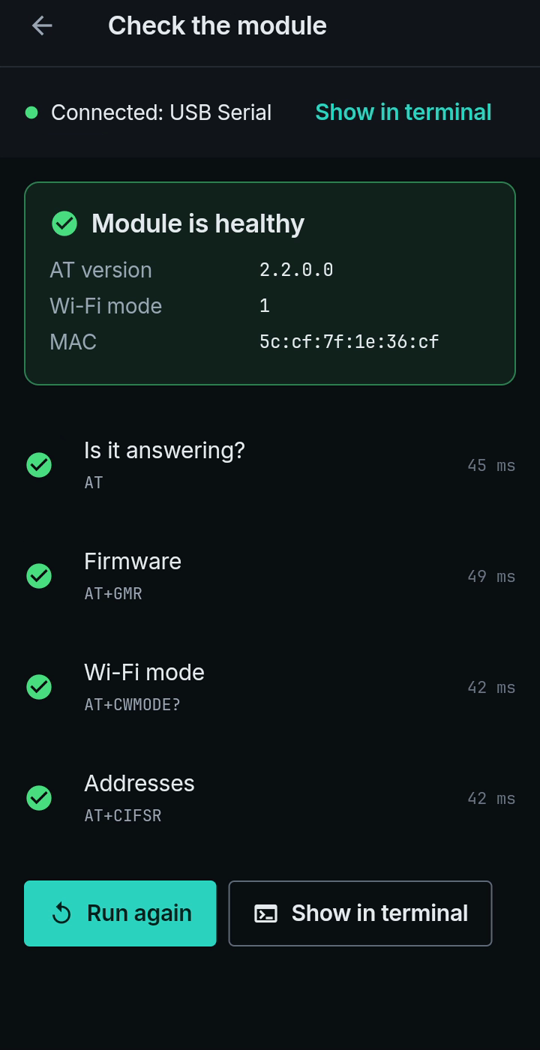
All four steps answered in well under a second.
The four commands
| Command | What it reads |
|---|---|
AT | Is it answering? |
AT+GMR | Firmware version |
AT+CWMODE? | Wi-Fi mode (1 = station, 2 = access point, 3 = both) |
AT+CIFSR | IP and MAC addresses |
Part of the session in the terminal:
20:39:34.514 TX AT+CWMODE?
20:39:34.541 RX AT+CWMODE?
+CWMODE:1
OK
20:39:34.556 TX AT+CIFSR
20:39:34.588 RX AT+CIFSR
+CIFSR:STAIP,"0.0.0.0"
The station address is 0.0.0.0 because the module had not joined a network.
It only reads
None of the four commands changes a setting on the module. You can run the check as often as you like.
Limits
- Recorded with AT firmware 2.2.0. Other AT versions may answer differently.
- If the check gets no answer, the baud rate may be wrong: see [Find the baud rate from your phone](find-baud-rate.html).
- Live-tested with a CH340 adapter on Android 9.
Try it
Watch the demo on YouTube. LinkJig is on Google Play and the Microsoft Store.